> For the complete documentation index, see [llms.txt](https://docs.toomuchmedia.com/llms.txt). Markdown versions of documentation pages are available by appending `.md` to page URLs; this page is available as [Markdown](https://docs.toomuchmedia.com/nats-admin/sites/further-reading/postbacks-and-post-urls/affiliate-postback.md).
# Affiliate Postback
*Article Topics:* [*Sites*](/getting-started/common-topics/sites.md)*,* [*Affiliates*](/getting-started/common-topics/affiliates.md)
With NATS, you can inform your affiliates of detailed member information based on any action the member takes through NATS. This is referred to as a **postback** and is made possible by using a backend POST, which is based on the basic actions the member takes in NATS.
For other postback examples, please view [Postbacks and Post URLs.](/nats-admin/sites/further-reading/postbacks-and-post-urls.md)
## Affiliate Admin Settings
NATS allows you to configure Affiliate Admin settings to permit specific postbacks per Affiliate. In the Configuration Admin, navigate to the Affiliates tab to configure these **Postback** settings.
For more information regarding the Postback settings in the Configuration Admin, please view [Configuration](/nats-admin/configuration.md).
### Available Postback Affiliates can receive
The following is a list of the possible postbacks your affiliates can receive.
* **Affiliate Post Member Approval** - Allow affiliates to receive a postback on member approval (includes perminute, seconds, initial and trial).
* **Affiliate Post Member Perminute** - Allow affiliates to receive a postback on member perminute approval.
* **Affiliate Post Member Seconds** - Allow affiliates to receive a postback on member seconds approval.
* **Affiliate Post Member Initial** - Allow affiliates to receive a postback on initial member approval.
* **Affiliate Post Member Trial** - Allow affiliates to receive a postback on member trial approval.
* **Affiliate Post Member Rebill** - Allow affiliates to receive a postback on member rebill.
* **Affiliate Post Member Upgrade** - Allow affiliates to receive a postback on member upgrade.
* **Affiliate Post Member Expire** - Allow affiliates to receive a postback on member expire.
* **Affiliate Post Member Insufficient Fund** - Allow affiliates to receive a postback on member insufficient funds.
* **Affiliate Post Member Credit** - Allow affiliates to receive a postback on member credit.
* **Affiliate Post Member Chargeback** - Allow affiliates to receive a postback on member chargeback.
* **Affiliate Post Member Void** - Allow affiliates to receive a postback on member void.
* **Affiliate Post Member Upgradedeny** - Allow affiliates to receive a postback on member upgrade denial.
* **Affiliate Post Member Change Details** - Allow affiliates to receive a postback on member change details.
* **Affiliate Post Member Void Reversal** - Allow affiliates to receive a postback on member void reversal.
* **Affiliate Post Member Credit Reversal** - Allow affiliates to receive a postback on member credit reversal.
* **Affiliate Post Member Chargeback Reversal** - Allow affiliates to receive a postback on member chargeback reversal.
* **Affiliate Post Member Insufficient Fund Reversal** - Allow affiliates to receive a postback on member insufficient funds reversal.
* **Affiliate Post Member Pre Approval** - Allow affiliates to receive a postback on member pre (note) approval.
* **Affiliate Post Member Pre Rebill** - Allow affiliates to receive a postback on member pre (note) rebill.
* **Affiliate Post Member Pending Approval** - Allow affiliates to receive a postback on member pending approval.
* **Affiliate Post Member Pending Rebill** - Allow affiliates to receive a postback on member pending rebill.
* **Affiliate Post Member Pending NCR** - Allow affiliates to receive a postback on member pending NCR.
### NATS Stored Postback Variables
The following is a list of the possible NATS stored information your affiliates can use to filter which postback variables they need sent.
* **Affiliate Post Extra Vars Campaignid** - Allow affiliates to post extra variables based on the campaign ID used.
* **Affiliate Post Extra Vars Programid** - Allow affiliates to post extra variables based on the prmgraid ID used.
* **Affiliate Post Extra Vars Siteid** - Allow affiliates to post extra variables based on the site ID used.
* **Affiliate Post Extra Vars Tourid**- Allow affiliates to post extra variables based on the tour ID used.
* **Affiliate Post Extra Vars Optionid** - Allow affiliates to post extra variables based on the option ID used.
* **Affiliate Post Extra Vars Adtoolid** - Allow affiliates to post extra variables based on the adtool ID used.
* **Affiliate Post Extra Vars Subid1** - Allow affiliates to post extra variables based on the sub ID 1 used.
* **Affiliate Post Extra Vars Subid2** - Allow affiliates to post extra variables based on the sub ID 2 used.
* **Affiliate Post Extra Vars Billerid** - Allow affiliates to post extra variables based on the biller ID used.
* **Affiliate Post Extra Vars Countryid** - Allow affiliates to post extra variables based on the country ID used.
* **Affiliate Post Extra Vars Promotionalid** - Allow affiliates to post extra variables based on the promotional ID used.
## Affiliate Configuration
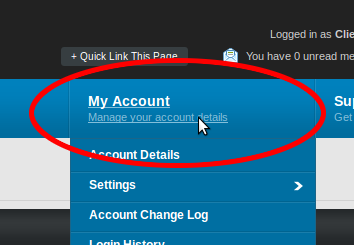
Once you have activated the postbacks you want your affiliates to be able to receive, your affiliates will be able to log in and enter the URL(s) where they want their postback(s) to be sent to. In order to set this, the affiliate needs to go to their "My Account" page, then click the Settings link.
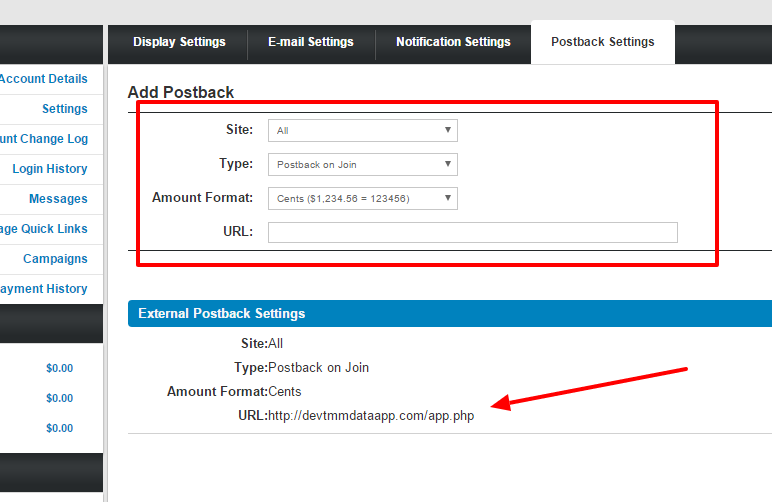
Once on the "Settings" page, they will find 4 tabs. Clicking "Postback Settings" will bring up a new page.
From there they can enter the URL(s) of the script(s) that will handle their postbacks, the site in which this postback would occur for, the transaction, and the amount format. Depending on which postback type has been configured in the admin, different types may be displayed in the dropdown.
Affiliates can configure multiple Postback Variables per transaction type. NATS will combine all the Postback Variables that meet the affiliate's configuration. Consider the following:
{% code overflow="wrap" %}
```
Your NATS install is using EPOCH and CCBill.
The affiliate configures three (3) Extra Postback Varaiables
1. Sends everything for all traffic
2. Sends a variable for EPOCH
3. Sends a variable for CCBILL.
If a CCBill transaction is processed, NATS will combine the variables from the first (everything) and last (CCBILL) Extra Postback Variables.
```
{% endcode %}
Affiliates can have NATS pass back custom information sent to NATS via the NATS subscription passthrough variables.
For more information, view [Additional Tracking](/using-nats/one-off-articles/additional-tracking.md).
## Postback Format
We will send the following information in the query string:
| **Variable Name** | **Description** |
| ----------------- | ------------------------------------------------------------------------------------------------------------------------------------ |
| identid | The NATS identifier used to internally associate a member with a campaign, program, site, tour, option, adtool, biller, and country. |
| loginid | The numeric NATS loginid for the affiliate receiving the post. |
| status | The status of the member that caused the post to trigger. (0 = never joined, 1 = active, 2 = expired) |
| trial | Set to 1 if the member who triggered the post is currently marked as a trial member. |
| joined | The date the member joined (as a UNIX timestamp). |
| expired | The date the member expired in NATS (as a UNIX timestamp). |
| siteid | The numeric NATS siteid that the member joined under. |
| statid | The numeric NATS statid that links the member to a stat record in the NATS database. |
| billerid | The numeric NATS billerid that the member processed their transaction. |
| optionid | The numeric NATS optionid that the member joined under. |
| rebills | The number of rebills the member has had since joining. |
| expires | The date the member is supposed to expire in NATS (as a UNIX timestamp). |
| campaignid | The numeric campaignid of which the the member was tracked. |
| campaign\_name | The alpha-numeric name of which the the member was tracked. |
| programid | The numeric programid of which the the member was tracked. |
| tourid | The numeric tourid of which the the member was tracked. |
| adtoolid | The numeric adtoolid of which the the member was tracked. |
| subid1 | The numeric subid1 of which the the member was tracked. |
| subid2 | The numeric subid2 of which the the member was tracked. |
| countryid | The numeric countryid of which the the member was tracked. |
| promotionalid | The numeric promotionalid of which the the member was tracked. |
| custom1 | The alpha-numeric custom1 variable assigned to the member. |
| custom2 | The alpha-numeric custom2 variable assigned to the member. |
| custom3 | The alpha-numeric custom3 variable assigned to the member. |
| custom4 | The alpha-numeric custom4 variable assigned to the member. |
| custom5 | The alpha-numeric custom5 variable assigned to the member. |
| custom6 | The alpha-numeric custom6 variable assigned to the member. |
| custom7 | The alpha-numeric custom7 variable assigned to the member. |
| custom8 | The alpha-numeric custom8 variable assigned to the member. |
| custom9 | The alpha-numeric custom9 variable assigned to the member. |
| custom10 | The alpha-numeric custom10 variable assigned to the member. |
| passthrough1 | The alpha-numeric passthrough1 variable assigned to the member. |
| passthrough2 | The alpha-numeric passthrough2 variable assigned to the member. |
| passthrough3 | The alpha-numeric passthrough3 variable assigned to the member. |
| passthrough4 | The alpha-numeric passthrough4 variable assigned to the member. |
| passthrough5 | The alpha-numeric passthrough5 variable assigned to the member. |
| forced\_optionid | The numeric forced\_optionid that the member joined under. |
| default\_optionid | The numeric defaulted\_optionid presented to the member. |
| amount | The dollar amount that the affiliate earned for this member's signup. |
### Affiliate Variable Options
If the affiliate only wants some of the variables listed, they should format the value pair in query string format as follows:
`{Index}=%%{Variable}%%`
Example:
`a=%%campaignid%%&b=%%amount%%`
If the affiliate wants to get all the available NATS variables and a custom variable(s), they should format the Extra Variables field as follows:
`{Index}=%%{Variable}%%&%%everything%% or {Index}=%%{Variable}%%&%%everything%% or {Index}=%%{Variable}%%&%%everything%%&{Index}={Variable}`
Example:
`a=xxx&%%everything%%&b=yyy`
## Postback Logging Script
The following example script allows you to log any Postbacks sent by NATS to your User Management script. This script will take any information being posted to the user management script, and store it in a specified log file. In order for this script to work, you must first make your user management log file writable by Apache. To do so, you must change the */path/to/nats4/user\_management.log* path found in the following sample script to where your NATS *user\_management.log* file is located.
{% hint style="info" %}
**Please Note:** Make sure that the log is NOT in a web-accessible folder.
{% endhint %}
{% code overflow="wrap" %}
```
$val) {
/** Add what the value is, what the name is. **/
if (is_array($val)) {
foreach ($val as $val_key => $val_val) $message .= "&{$key}[{$val_key}]={$val_val}";
}
else $message .= "&{$key}={$val}";
}
/** Adding a return message to the log **/
$message .= "\n";
/** Adding the log to the specified file **/
error_log($message, 3, '/path/to/nats4/user_management.log');
/** Respond NOTOK so the User Management call isn't triggered **/
echo 'NOTOK';
?>
```
{% endcode %}
## Related Articles
{% content-ref url="/pages/IUHBvD0GL0BTZMuEbjfb" %}
[Configuration](/nats-admin/configuration.md)
{% endcontent-ref %}