> For the complete documentation index, see [llms.txt](https://docs.toomuchmedia.com/llms.txt). Markdown versions of documentation pages are available by appending `.md` to page URLs; this page is available as [Markdown](https://docs.toomuchmedia.com/nats-admin/billers/further-reading/cascade-weights-and-types/automatic-cascade.md).
# Automatic Cascade
*Article Topics:* [*Cascades*](/getting-started/common-topics/cascades.md)
NATS offers a feature called "Autocascade", which allows visitors to bypass the standard NATS pre-join form and go directly to a biller join form. As a result, the Automatic Cascade feature will also bypass the authentication procedure in the NATS pre-join form.
To use the Automatic Cascade feature, navigate to the [Billers Admin ](/nats-admin/billers.md)and edit the biller [cascade](/additional-resources/common-terms.md#cascade) you would like to affect. Under the "Details" tab, you can either set the cascade's weight to *256*, or update the Type to "Automatic Cascade."
To learn how to create a new Cascade, see "[How to Add, Hide, Disable and Restore a Cascade.](/nats-admin/billers/common-questions/how-to-add-hide-disable-and-restore-a-cascade.md)"
## Normal Join Form and Cascading Behavior
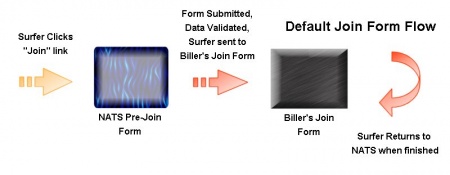
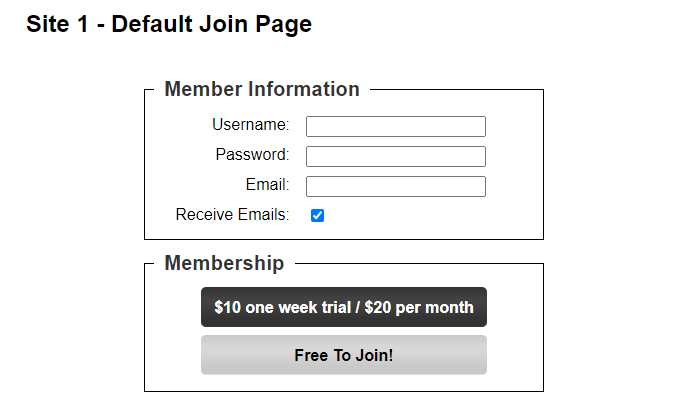
Typically, when visitors click a join form link, it will take them to the NATS pre-join form. This form captures their information and checks your database to see if their desired username and email address have already been taken. After submission, the NATS pre-join form validates the data submitted and sends the visitor to the first biller in your cascade's join form.
If Automatic Cascading is enabled in the NATS Billers Admin, then NATS will bypass the NATS pre-join form and automatically send the visitor to the biller's join form.
Normally if a visitor hits a NATS pre-join form, completes the form, and never fully signs up, you'll see a record similar to that of the Figure below.
However, if Automatic Cascading has been enabled, you'll see accounts that look more like that of the following Figure.
If you take a closer look at the member record in the first example, you will notice that it contains a username, password, and email address. This information was recorded in the NATS pre-join form, and allows you to reference this member's record in the future or use the information for a subsequent never-joined advertisement [campaign](/additional-resources/common-terms.md#campaign).
As for the member record in the second example, because it was created through an Automatic Cascade, it contains no visitor-submitted data. This makes it essentially a useless record, as it contains no important member information.
## Benefits and Drawbacks of Automatically Cascading
Many visitors prefer Automatic Cascades, as it generally reduces the amount of information necessary to sign up. When a potential member only has a single [join form ](/additional-resources/common-terms.md#join-form)to complete, instead of multiple, they will generally be more receptive to completing the transaction.
In contrast, many clients and [affiliates ](/additional-resources/common-terms.md#affiliate)prefer the regular cascading method and pre-join form, as it is usually more practical. The regular method allows you to retain future marketing information and also have a pre-join record of that visitor that can be used for future troubleshooting.
## Related Articles
{% content-ref url="/pages/EM4AXTEA69LAWpjwJEW4" %}
[Cascades](/nats-admin/billers/cascades.md)
{% endcontent-ref %}